 Steam Catalog

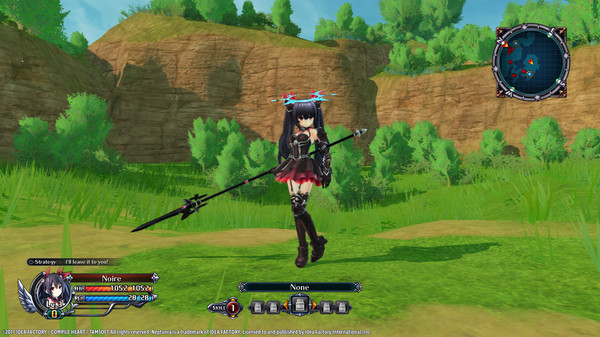
Cyberdimension Neptunia: 4 Goddesses Online - Black Heart Angel Ring
Описание
Black Heart Angel Ring will be added to your item inventory.
An accessory that looks like an angel ring.
*After installation of the DLC access the "DLC" option on the title screen to turn the purchased DLC to "ON".
1. Start "Cyberdimension Neptunia: 4 Goddesses Online"
2. In "DLC" enable "ON" for the new DLCs
3. Load a save file
4. Enter the World Map
5. Enter a dungeon
6. Open the Menu
7. Select "Customize"
8. Under Accessories, select a slot
9. Scroll down to the bottom for the 9 new DLCs
10. Select Black Heart Angel Ring
Минимальные системные требования (ПК)
Минимальные:
- ОС *: Windows 7 (64-bit)
- Процессор: Intel Corei7-3770
- Оперативная память: 8 GB ОЗУ
- Видеокарта: NVIDIA GeForce GTX 660 or comparable
- DirectX: версии 11
- Место на диске: 10 GB
- Звуковая карта: Windows compatible sound card
- Дополнительно: Caution: ATI Mobility Radeon HD 5xxx, 1GB VRAM 5000 series, AMD processor may not work properly with this game.
Рекомендуемые системные требования (ПК)
Рекомендованные:
- ОС: Windows 10 (64-bit)
- Процессор: Intel Corei7-3770
- Оперативная память: 8 GB ОЗУ
- Видеокарта: NVIDIA GeForce GTX 960 or comparable
- DirectX: версии 11
- Место на диске: 10 GB
- Звуковая карта: Windows compatible sound card
- Дополнительно: Caution: ATI Mobility Radeon HD 5xxx, 1GB VRAM 5000 series, AMD processor may not work properly with this game.
Галерея
Комментарии (0)
Оставить комментарий
Чтобы оставить комментарий, войдите или зарегистрируйтесь.